Cute Frame: Hand-Drawn Borders for Your Digital Projects
Imagine transforming your standard keyboard into a whimsical design studio. That’s the core promise of Cute Frame Hand Drawn, a specialized dingbats font that redefines how we approach digital borders. Instead of searching for generic clip art or struggling with complex vector software, this tool allows you to type a character and instantly generate a beautifully sketched frame. It shifts the focus from technical execution to creative flow, making the act of designing feel more like crafting. This isn't just about decoration; it's about injecting personality and warmth into projects that might otherwise feel sterile or overly digital.
More Than Just a Pretty Border
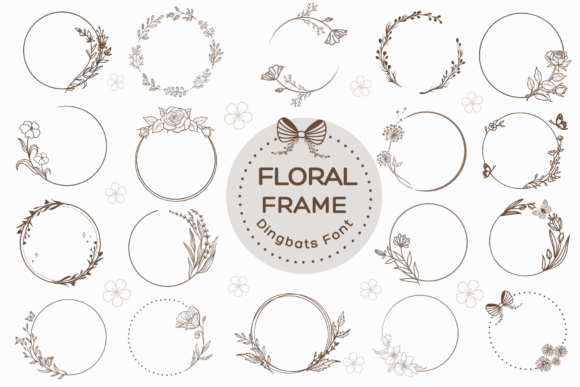
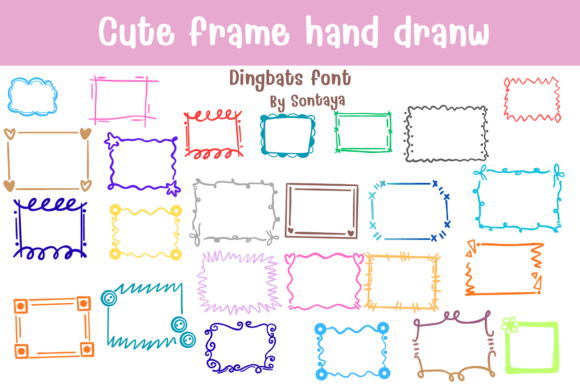
At its heart, Cute Frame is a collection of vector-based, hand-drawn illustrations mapped to keyboard keys. Each keystroke unlocks a unique border design, from playful squiggles and romantic corner hearts to cloud loops and geometric zigzag ripples. The designs are optimized with clean paths and consistent monoline weights, which is a critical technical detail. This ensures they cut flawlessly on electronic craft plotters like Cricut and Silhouette machines, but it also means they scale perfectly for digital use without losing quality or becoming jagged. The result is a versatile library of frames that feel organic and intentionally crafted.
Why a Font-Based Approach Matters
Using a dingbats font for frames offers distinct advantages over traditional clip art. For one, it’s incredibly efficient. You don’t need to leave your word processor, design app, or planner software to find the perfect border. Simply select the font, type the corresponding letter, and your frame appears. This workflow is a game-changer for anyone who values speed and simplicity. Furthermore, because it’s a font, the frames are infinitely scalable and lightweight, placing minimal strain on your computer’s resources compared to high-resolution image files. This method bridges the gap between the tactile joy of hand-drawn art and the precision of digital tools.
A Tool for Every Creative Mind
The appeal of Cute Frame Hand Drawn is broad, but its value manifests differently depending on who you are and what you’re trying to achieve. Its utility isn't confined to one niche; it adapts to the priorities of various creators, professionals, and hobbyists.
For the Beginner and the Hobbyist
If you’re new to digital crafting or design, the learning curve can be intimidating. Cute Frame lowers that barrier significantly. There’s no need to master the pen tool in Illustrator or understand complex layer masks. The process is intuitive: type, and you get art. This makes it an exceptional choice for designing personalized digital stickers, creating cute family scrapbook templates, or assembling playful handmade greeting cards. The ease of use encourages experimentation. A hobbyist can quickly mock up a card design for a friend’s birthday, framing a heartfelt message with a border of delicate buttons or dashed marker notches, all within minutes. The priority here is accessibility and the joy of creation without frustration.
For Educators and Parents
For teachers, tutors, and parents, time is a precious commodity. Creating engaging materials for children often requires a balance of visual appeal and functionality. Cute Frame excels in this environment. It’s perfect for designing children’s educational planners and custom kindergarten classroom worksheets. A teacher can frame a spelling list with playful cloud loops, making the activity feel less like a chore and more like a game. The consistent, clear lines of the frames ensure that they don’t distract from the educational content but rather enhance it. The reliability of the cuts means that if a worksheet is also used for a cutting activity, the lines will be precise. The focus is on creating effective, engaging learning aids efficiently.
For Small Business Owners and Entrepreneurs
In the world of small business, branding and presentation are everything. Whether you’re an Etsy shop owner, a local bakery, or a freelance consultant, the details matter. Cute Frame offers a cost-effective way to elevate your visual identity. Use it to border quotes for social media posts, highlight titles on product packaging, or frame photographs in your digital catalog. A consistent, charming border style can become a recognizable part of your brand’s aesthetic. For a business owner, the priorities are often commercial value, speed, and professionalism. This font delivers a polished, custom look without the expense of hiring a designer for every small graphic need. It allows for rapid content creation that maintains a high-quality, cohesive feel.
For the Experienced Designer and Freelancer
Even seasoned professionals can find a strategic use for a tool like Cute Frame. While they may possess the skills to draw these borders manually, doing so for every project is time-prohibitive. This font acts as an incredible design shortcut. A freelancer designing a set of social media graphics for a client can use these frames to quickly establish a whimsical theme in mockups, saving billable hours. The key for this audience is evaluating the font’s quality, flexibility, and integration into existing workflows. The clean vector paths are non-negotiable, as they allow for easy color changes, scaling, and editing within professional software like Adobe Illustrator. It becomes a versatile asset in their toolkit, used when the project calls for a specific handcrafted aesthetic.
Evaluating If Cute Frame Is Right for You
Deciding whether to incorporate Cute Frame Hand Drawn into your workflow depends on aligning its strengths with your specific goals. Consider your primary needs:
- Ease of Use vs. Control: If you prioritize a quick, intuitive process over granular control over every anchor point, this font is ideal. If you require absolute bespoke customization from scratch, it may serve as a starting point rather than a final solution.
- Project Type: It shines in projects where a playful, handmade, or cozy aesthetic is desired. This includes planners, stickers, educational materials, greeting cards, and casual branding. It may be less suited for ultra-modern, minimalist, or corporate designs where a hand-drawn feel isn’t appropriate.
- Technical Requirements: Confirm that your software supports OpenType or standard dingbats fonts. If you use a craft plotter, the font’s optimized paths are a significant benefit. For purely digital use, its scalability and lightweight nature are key advantages.
- Long-Term Usefulness: Think about the variety of your projects. If you frequently need decorative borders, investing in a diverse collection like this can provide long-term value and creative inspiration. It’s a resource you’ll return to across different seasons and occasions.
Ultimately, Cute Frame Hand Drawn is more than a novelty. It’s a practical bridge between analog charm and digital efficiency. It empowers users across the skill spectrum to add a layer of warmth and personality to their work with remarkable speed. By understanding how its features translate to benefits for your unique context, you can determine if this whimsical tool is the right addition to your creative arsenal. It’s about finding the right tool that feels less like a technical hurdle and more like a natural extension of your own creative voice.